AI teacher that explains your homework on video

Scan a question and watch every step explained out loud — not a text answer you have to decode on your own. Coding, flowcharts, research, graphs and writing help are in the same app, on one login.

Free to start · Photo scan · No separate subscription per tool

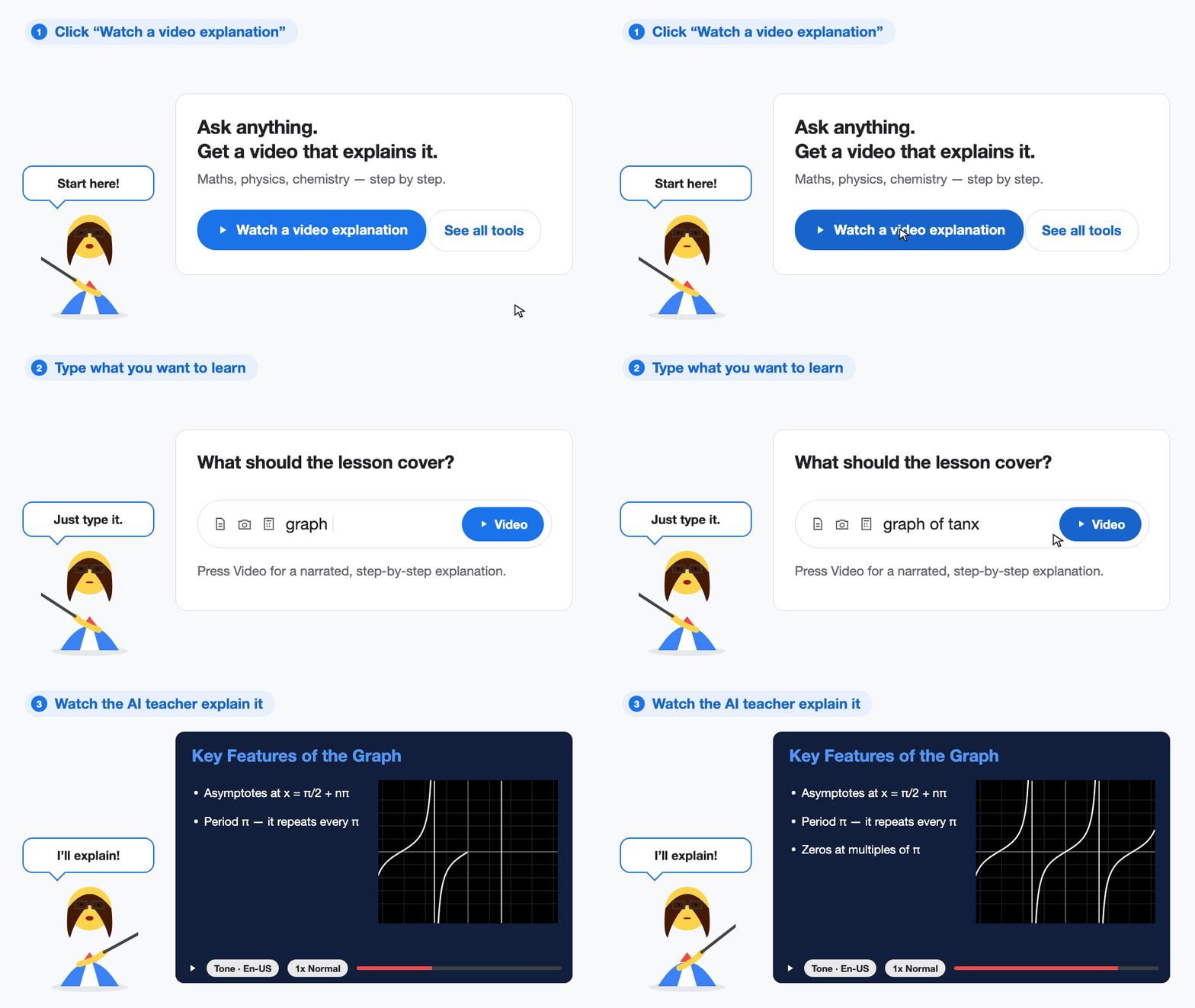
Demo: typing “graph of tanx” into StudyHobby and pressing Video, then an AI teacher explaining the graph step by step on a narrated slide
Type your question → press Video → the AI teacher explains each step
How it works

Three steps from stuck to understanding it

You do not get a bare answer. You get the method, taught in order, so the next question is easier.

Step 1

Scan or type your question

Take a photo of the worksheet, or type the question. StudyHobby reads the homework for you.

Step 2

Watch the AI teacher explain it

A short video plays — a teacher voice walking through each step on slides, with the working drawn out.

Step 3

Understand it, then try it yourself

Pause, rewind, and learn why each step works so you can solve the next question on your own.

Everything in one app

7 study tools, one login

Most students end up juggling a chat app, a diagram app, a graphing app and a writing app. These all live in the same place, so you can move from your math homework to your coding assignment without switching tabs.

Start here

Video Answers

An AI teacher explains your question step by step on slides, out loud — instead of handing you a block of text.

Open Video Answers →

Ask Questions

A normal chat for quick doubts, with a choice of AI models so you can pick the one that suits the subject.

Open Ask Questions →

AI Coding Agent

A real code editor for Python, Java, C, C++, JavaScript and more. Run your code, then ask why it broke.

Open AI Coding Agent →

Flowchart Answers

Describe a process and get a clean flowchart you can edit and download for your notes or project file.

Open Flowchart Answers →

Web Researcher

Deep research from live websites with the sources listed — good for current affairs, projects, internships and jobs.

Open Web Researcher →

Graphing Calculator

Plot functions, add points and lines, and ask the AI to draw on the graph while it explains what the shape means.

Open Graphing Calculator →

Write in your own tone

Paste a sample of your own writing and StudyHobby rewrites text to sound like you, not like a robot.

Open Write in your own tone →
Built for a student budget

One place instead of four subscriptions

Paying separately for every AI tool adds up fast, and none of them talk to each other. StudyHobby keeps your homework, your code, your diagrams and your research in one account.

  • Start free — no card needed to try a video explanation
  • Switch between AI models instead of being locked to one
  • Your chats, notes and code stay in the same account
  • Works in the browser on a school laptop or a phone
Graphing calculator

Play with the graph until the math makes sense

Slope, parabolas, circles, “sketch this function” — drawing it is faster than imagining it. Plot the equation, drag it around, and ask the AI what the shape is telling you.

Plot it instantly

Type a function and see the curve straight away — no separate graphing app to install for class.

Zoom in on the detail

Pan, zoom and check intercepts so you can compare a real graph against your homework sketch.

The AI draws with you

Ask for a point, a line or a tangent and it appears on the graph while the explanation plays.

Open the graphing calculator
Why video, not text

A long answer is easy to skim and forget

After a full school day, a dense paragraph is hard to finish. Hearing one step at a time keeps you with it.

A wall of text

  • Slow to read when you are already stuck
  • Easy to miss the one step that mattered
  • You get the answer, not the method
  • Every equation has to be typed out first

An AI teacher video

  • One step at a time, explained out loud
  • Pause and replay until it clicks
  • Teaches the method, so you can repeat it
  • Scan the page instead of typing it
Built for real study nights

What students use StudyHobby for

Math homework

Algebra, equations and word problems solved step by step on video.

Coding assignments

Write and run code, then get the error explained in plain English.

Diagrams for projects

Turn a process into a flowchart you can drop into a report.

Current affairs and exams

Research a topic from live sources and get a summary you can revise from.

Internships and jobs

Search the web for openings and deadlines without opening twenty tabs.

Essays that sound like you

Rewrite a draft in your own tone instead of a stiff AI voice.

Student feedback

What students say

“I scanned my algebra worksheet and got a math video that walked through every step. Felt like a real teacher.”

Jordan M. · 9th Grade

“Long ChatGPT answers put me to sleep. Short StudyHobby videos finally made the method stick before quizzes.”

Priya S. · 11th Grade

“AI video homework help is so much faster at night than reading pages of text.”

Aisha K. · 12th Grade
FAQ

Questions students ask first

You ask a question or scan a math problem, and StudyHobby builds a short video that explains the solution step by step — a teacher voice with slides and working, not a wall of text.

Yes. Snap or upload a photo of the page. StudyHobby reads the problem and turns it into a step-by-step video lesson.

The same account includes an AI coding agent with a real code editor, a flowchart maker, a web researcher for current affairs and internships, a graphing calculator, and a rewriter that matches your own writing tone.

No. That is the point of StudyHobby — one login covers all the tools instead of paying a monthly fee for a chat app, a diagram app, a graphing app and a writing app. You can start free.

Yes. Open the AI Coding Agent, write code in the editor in Python, Java, C++, JavaScript and other languages, run it, and ask the AI to explain the error or the concept behind it.

Yes. The Web Researcher reads live websites and gives you a written summary with its sources, so you can check where each fact came from.

Yes. There is a graphing calculator inside the chat, and a fuller Math Playground where you can plot functions and ask the AI to draw points, lines and curves while it explains them.

Use it like a real tutor: watch the steps, learn the method, then finish the work yourself. The goal is understanding the concept, not copying an answer.

Free study guides

Guides for getting more out of each tool

Walkthroughs written for students, with the exact prompts and settings to use.

Make an AI math video →Solve homework from a photo →Use the AI graphing calculator →Generate a flowchart with AI →Write in your own tone →Ask math questions free →

Browse all guides →

Takes under a minute to start

Bring tonight’s homework question

Scan it or type it, and watch the AI teacher work through it step by step. Free to start.

Start with Video Answers